

Hello electronic brands,
If your current marketing campaigns are underperforming, it is worth examining the role of visual assets in your conversion pipeline. In this category, buyers closely evaluate port configurations for compatibility, control interfaces for usability, display fidelity for color accuracy and sharpness, surface textures for material quality, and relative scale for real-world proportions. They also assess build precision, alignment of components, labeling clarity, and finish consistency, all of which influence perceived durability, functionality, and overall product reliability before purchase decisions are made. The objective, therefore, is to optimize composition by reducing visual noise, maintaining contextual relevance, and accurately representing functional features.
So, how can this be achieved?
In this blog, we will outline practical, technically grounded approaches to capturing electronic products effectively, along with how these improvements can directly contribute to higher engagement and conversion rates.
Clean Visual Strategy For Electronic Photography: OverviewClean, high-resolution electronics photography directly impacts conversions, returns, and discoverability. With shoppers relying on visuals and detailed images to boost conversions by clarity becomes critical. Techniques like controlled lighting, focus stacking, glare reduction, light tents, and minimal props highlight features without distraction. Consistent backgrounds, angles, and editing create a cohesive catalog that builds trust, improves UX, and helps customers confidently compare products and purchase faster. |
Why Clean Photography Is Essential for Electronics Products?
Highlights Precision Engineering and Micro-Component Detailing
Electronics products are engineered with extremely fine tolerances, often measured in microns. Clean, high-resolution electronic product photography:
- Reveals intricate mechanical features such as nano-textured surfaces, precision-milled frames, and micro-machined parts.
- Captures details like screw placements, panel seams, connector housings, and micro vents that are critical for understanding product construction.
- Helps validate quality control and assembly excellence in industrial documentation.
Without crisp, detailed photography, these engineering nuances are lost or misinterpreted.
Accurately Showcases Display Panel Performance (OLED, IPS, Mini-LED)
Display technologies differ significantly in brightness, color accuracy, contrast ratios, and viewing angles. Clean photography ensures:
- True representation of screen capabilities — not washed out or color-shifted due to reflections or poor lighting.
- Accurate depiction of deep blacks in OLED, wide color gamuts on IPS, or local dimming performance on mini-LED displays.
Poor photos can mislead buyers about real display performance, leading to dissatisfaction.
Preserves True Color Accuracy for Screen-Based Devices
Color fidelity isn’t only for aesthetic products, it’s essential in electronics photography because:
- Technical buyers compare specifications like sRGB, Adobe RGB, DCI-P3 coverage visually.
- Misrepresentation of color purity can lead to incorrect conclusions about display quality or color calibration.
- Accurate white balance and color profiles must be maintained from capture through processing.
This is especially important for devices used in content creation, diagnostics, or visual production.
Electronic Product Images Decide Conversion Rate
When you step out to shop for some electronic goods, the first thing you would want to do is test the electronic items, understand how the touch works, and confer advanced features. The same is the case while shopping online, which is why high-resolution, clean electronics product photography becomes inevitable. In fact, studies published in Research Gate show that high-resolution, detailed product images can increase conversion rates by up to 67%.
Simply put: If shoppers can see exactly what they’re getting, they’re much more likely to click “buy. This even reduces the chances of return.”
Shooting Techniques That Eliminate Visual Clutter
Three-Point Lighting for Feature Clarity
Electronic products have very small ports and buttons that aren’t visible at first sight if not highlighted properly in the image. Poor lighting can hide these features in shadows. Hence, to highlight these features of your electronics, you need to place the lights perfectly. So, what you want to do is place a soft key light at a 45° angle. Next, add a weaker fill light on the opposite side to soften shadows. Finally, place a rim light behind the product for separation. This setup is perfect to reveal textures and contours clearly while preventing dark or distracting shadows that can hide functional features. There are various other ways to light the product properly. But for that you need to make sure you have a trusted professional by your side as they know in and out of lighting.
Focus Stacking for Detail Sharpness
Electronics often contain tiny, high-importance details like speaker grills, labels, vents, or micro-text. With a normal depth of field, only part of the device stays sharp while the rest blurs.
But now you also must have seen electronics product photography online that looks like you are viewing the original electronic item live. Want to learn how to do it? Here’s how:
The camera is fixed on a stable tripod to eliminate spatial variance, and a sequence of exposures is taken while incrementally adjusting the focal plane from the nearest surface to the furthest point of the subject. Each frame isolates a different depth slice in optimal sharpness. These images are then computationally combined by professionals in photography using specialized stacking software that analyzes local contrast and selects only the sharpest regions from each frame. The result is a composite image with extended depth of field, where all critical features—from surface textures to recessed ports—are simultaneously in focus. This technique enhances perceived precision, minimizes optical compromise, and produces a clean, technically refined visual output suitable for high-end product presentation.
Polarizing Filter for Reflection Control
Now, the problem with electronics is their glossy screen that adds glare to the images, creating messy highlights. To counter this issue, you need to attach a circular polarizer to your lens and rotate it until glare disappears from glass screens. Once these reflections are removed, viewers see the actual screen and finish, not distracting glare.
Light Tent for Small Accessories
If you are capturing compact items like earbuds, cables, or chargers, it may be a good idea to place them inside a light tent and position lights outside the fabric walls. This tent will help diffuse light evenly around the object. In turn, this removes those harsh shadows. So you get clutter shadow-free images.
Minimal Props for Scale
Size perception is a frequent problem in electronics purchases. Customers often misjudge how large or small a device actually is, which leads to returns. Now, in clean photography, it is usually advised not to use props. But that’s not completely right. If you need to show the size or usage of your electronic product, you need to include only one neutral, relevant prop. For instance, you could use a hand holding the device or a simple desk surface. Just make sure the prop you use is not colorful or has decorative elements, as they can distract from the product.
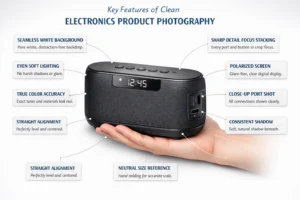
Tips to Maintain a Consistent Brand Look
- Lock one background color: To make your online catalog uniform, you need to use the same pure white or neutral sweep every time. Mixed backgrounds make products look unrelated and messy in catalog grids.
- Reuse the exact lighting setup: Next, use the same light angles, the same power, every shoot. This is because electronic surfaces (glass, metal, plastic) reflect light differently, so changing setups results in inconsistent reflections.
- Shoot at the same focal length (85–100mm): Wide lenses distort shapes, so what you need to do is use a consistent focal length to keep devices proportional and realistic.
- Keep camera height identical: Don’t shoot one laptop from above and another from eye level. Matching perspective makes the lineup feel clean and comparable.
- Keep shadow style consistent: Pick soft shadow or shadowless and stick to it. Mixing both breaks visual harmony.
- Apply one editing style: Same contrast, tones, and sharpness across all images. Think “one vibe,” not 20 different moods.
By following these tips, you can easily get consistency across your images. To better understand the architecture of e-commerce product photography, check out our blog!
Conclusion
Great visuals aren’t just decoration; they’re your silent sales team. They are what will make the first impression on your customers and help build brand recall in seconds. So, if you want expert execution without trial and error, partner with professionals who specialize in tech imagery. Elena Vels Studio delivers precision-driven shoots, polished workflows, and ready-to-convert assets.
Reach out to us today and let your products speak louder for a stronger online performance.
FAQs
What resolution is best for electronics product photos?
For electronic product photos, you need to aim for at least 2000–3000 pixels on the longest side. This high resolution supports zoom features, reveals fine details, and meets most e-commerce platform requirements without losing clarity.
Which file format should electronics images be saved in?
You can always use JPEG for web listings due to its smaller size and fast loading. Keep TIFF or RAW masters for editing. PNG works for transparent backgrounds or layered marketing creatives.
How many images should each electronics product listing have?
Most marketplaces recommend uploading at least 5 to 8 images. These should be from different angles so that the customer can get different perspectives.
Do 360-degree or spin images help sales?
This is in trend these days, interactive spins allow customers to explore the product virtually. This often increases purchase confidence for tech items with multiple physical features.
What image size works best for mobile shoppers?
For mobile shoppers, images around 1200–2000 pixels are of perfect clarity. They load quickly on smartphones while still allowing zoom.